CLI
Start your reviewfrom the terminal.
Whoever wrote the change, understanding it is still your job. One command reads it, works out what deserves your attention, and opens a review workspace in your browser. The analysis runs against an isolated checkout, so your own working tree is never read or written and you can carry on where you were.
- Guided workflow
- Use your own coding agent
- Private by default
- No account, no API key
$ prreviewbuddy review --branch feat/subscription-proration ✓ Prepared isolated checkout ✓ Read what changed ✓ Read pull request conversation ⠻ Analysing the change Review ready at http://127.0.0.1:7420/r/8f3c1d20-…The CLI workflow
From your terminal to a guided review
Run one command. Get a structured review workspace. You stay in control of every decision in it.
Run one command
Review the branch you are on, another branch without checking it out, or a pull request by URL.
An isolated checkout
A git worktree pinned to one commit. Your tree is untouched, and closing the terminal does not stop the job.
The workspace opens
The link prints before the analysis finishes and fills in as the review is made.
Review and decide
Walk the themes, ask questions, mark what you have judged, and make the call.
Structured from the start
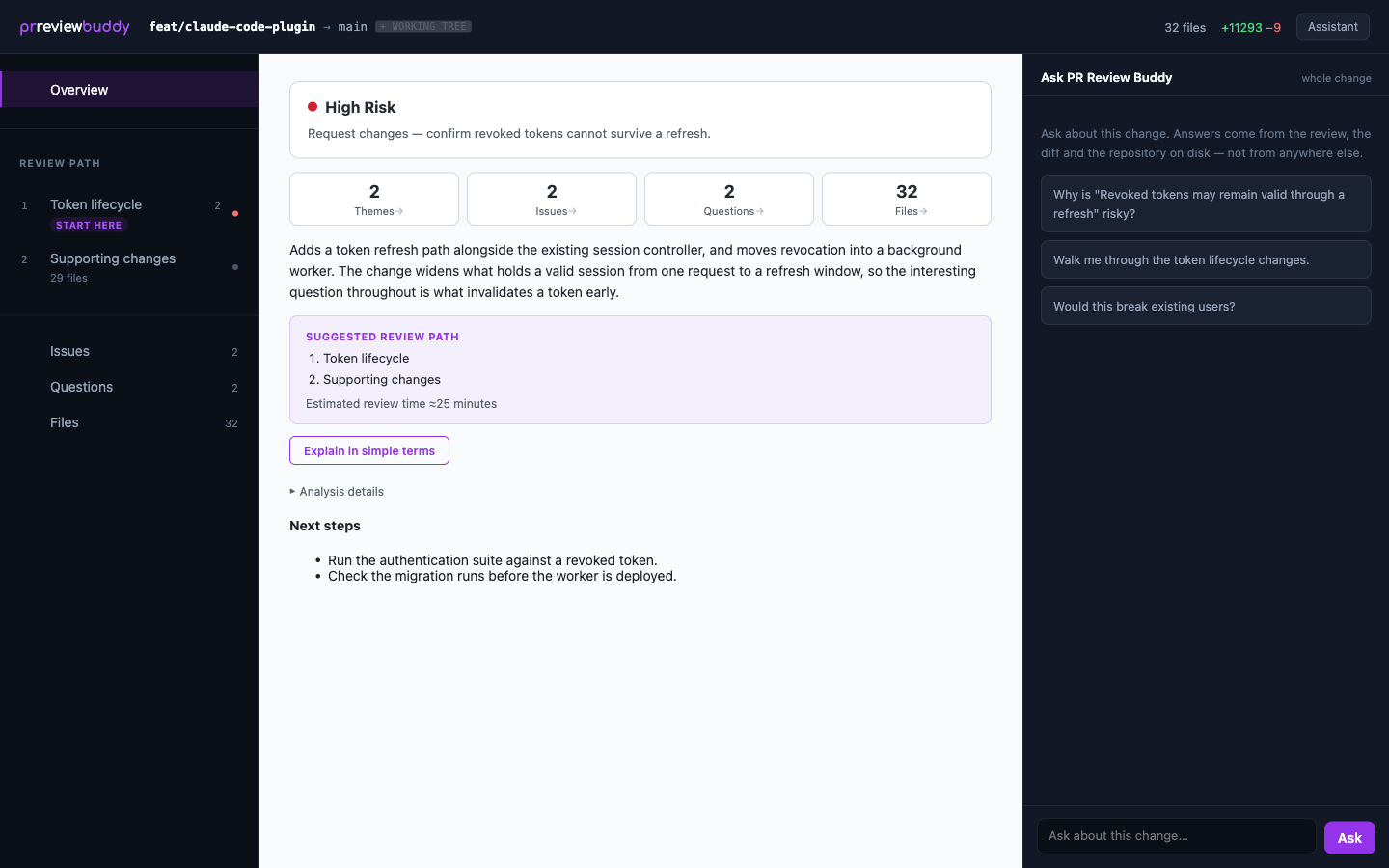
Know what matters before you dive in
The analysis gives you a structure, not a verdict. Whether a teammate or an agent wrote the change, you start by seeing what changed, where the risk is, and which assumptions deserve scrutiny. Nothing here is a decision that has been made for you.
- A review path, in a suggested order, with one theme marked as the place to start
- An overall risk level, and the potential issues behind it
- Open questions worth putting to the author, each with why it matters
- Every changed file, grouped under the theme that owns it
See it in action
A review, from start to finish
From the first analysis to the final decision, all in one guided workspace. Every screenshot below is a real review; select one to read it full size.
KISS lens
Ask whether the change is more complex than the problem.
A change can be correct, tested and still carry more abstraction, indirection and configuration than the problem called for. The KISS lens, named for the classic “keep it simple” principle, runs over the same change as a separate review, looking only for that, so simplicity gets deliberate scrutiny instead of being buried among general findings.
$ prreviewbuddy review --lens kiss \ --audience reviewerSay whose code it is, every time
PR Review Buddy never infers this from the branch you named. The same person is an author on Monday and a reviewer on Tuesday, and only one of the two answers should produce draft comments about somebody else’s work.
Reviewing your own code
Direct suggestions for simplifying it before you submit it.
Reviewing someone else’s
Recommendations, how worthwhile each one is to raise, and draft comments to leave.
Ranked by what it is worth, not by how bad it is
A simplification is not a defect, so nothing here is critical, major or minor. Each recommendation carries what acting on it would buy you, and answers four things: what was introduced, the evidence in this change, why the requirements do not call for it, and a simpler direction.
- High-value simplification
- Worth considering
- Nit
Complexity worth keeping
The report also lists the machinery it looked at and decided to leave alone, with the reasoning. You see a considered answer rather than only a list of objections, and the conclusion is written in plain language rather than as a score.
The standard is never fewer lines. It is no more complexity than the problem requires.
Why start from the CLI?
Fastest way to start
One command, and the workspace link prints before the analysis has finished.
Review any branch
Review a branch you are not standing on, or a pull request by URL, without checking anything out.
Never touches your checkout
The analysis runs in a worktree pinned to one commit, so a review cannot disturb the work you are in the middle of.
Private by default
Reviews live in ~/.prreviewbuddy on your machine. There is no server of ours anywhere in the path.
Get started
Install in seconds
- 1
Install
One global npm package. Node 20 or newer.
- 2
Check your agents
Lists the coding agents this machine has, and which one runs when you do not name one.
- 3
Review
Analyses the branch you are on and opens the workspace when it is ready.
# 1 — Install$ npm install -g prreviewbuddy# 2 — Check which coding agents you have$ prreviewbuddy agents# 3 — Review$ cd your-repo$ prreviewbuddy reviewWhat you need
Node 20 or newer, git, and Claude Code or Codex CLI signed in as you already use it. The GitHub CLI, if you want a pull request’s existing conversation read into the review.
No account. No API key. Nothing to connect. The analysis runs through the coding agent already on your machine, under the sign-in it already has. PR Review Buddy needs no model credential of its own.
Understand the change before you approve it.
Install the CLI and start your first guided review.
AI investigates. You decide.